
Yelp Insights + Listings Management Guide
Getting Started: Yelp Insights + Listing Management Partners
This guide walks you through the full integration for Yelp Insights (YI) and Listing Management (LM) partners. By the end, you'll be able to search for and match business locations, update listing information, retrieve and respond to reviews, and pull business metrics.
Prerequisites
Before starting your integration, complete the following:
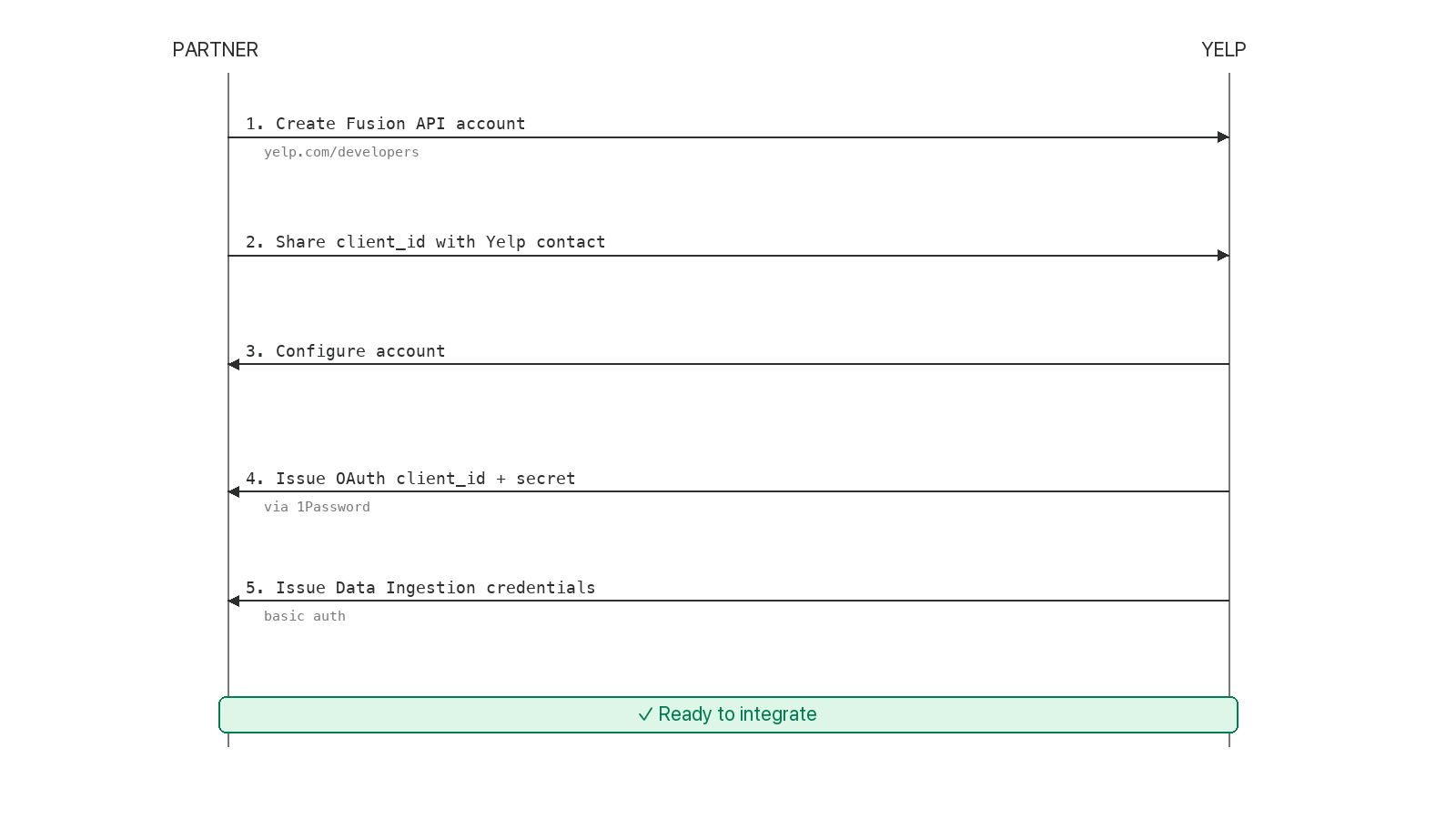
| Step | Who | Action |
|---|---|---|
| 1 | Partner | Create a Fusion API account — log in with an existing or new Yelp consumer account |
| 2 | Partner | Create an app and share your client_id with your Yelp contact |
| 3 | Yelp | Configure your Fusion API account and issue credentials |
| 4 | Yelp | Provide OAuth client_id + client_secret (same client_id from step 2) |
| 5 | Yelp | Provide Data Ingestion API credentials (basic auth) |
Note: You may see references to paid access or a trial period in the Fusion dashboard, ignore these. Yelp will opt you out of that flow once you share your
client_id
Here's a data flow visual of the above information:
Determine Your Product Type
Your integration path depends on the product purchased:
| Product | Subscription Types | Capabilities |
|---|---|---|
| YI + LM | YELP_KNOWLEDGE + LISTING_MANAGEMENT | Listing updates, reviews, respond to reviews, metrics |
| MEC (Mutual Enterprise Customers) | YELP_KNOWLEDGE + LISTING_MANAGEMENT | Same as YI+LM : differs based on advertiser status |
| SMB Listing Management only | LISTING_MANAGEMENT | Listing updates + metrics only (< 10 locations) |
| Reviews Only | YELP_KNOWLEDGE | Retrieve and respond to reviews only |
Yelp determines which product was consumed (and invoices accordingly) based on the subscription types you use. Choose the correct types for your product — see Managing Subscriptions for details.
Step 1: Find the Yelp business id(s)
Before you can manage a location, you need its Yelp business_id. Use the Fusion API to search:
Business Match (recommended, most precise)
GET https://api.yelp.com/v3/businesses/matches
Input: Name, address, city, state, country
Returns: Exact match by NAP (Name, Address, Phone)
GET https://api.yelp.com/v3/businesses/search/phone
Input: Phone number
Returns: List of matching business IDs
Business Search (least precise)
GET https://api.yelp.com/v3/businesses/search
Input: Term (e.g., "coffee"), location (e.g., "Houston")
Returns: List of matching business IDs
Best practice: Use Business Match first. Fall back to Phone Search or Business Search only if no match is found. Always verify the match is correct before subscribing.
Alternative: Retrieve claimed businesses via OAuth
If the business owner has already claimed their locations on Yelp, you can retrieve their business IDs directly. Unclaimed locations will not be returned here, it's possible for a location to exist on Yelp and not be claimed.
- OAuth the business owner with scope
r2r_get_businesses - Call the "Get Businesses" endpoint to retrieve their claimed business IDs
Step 2: Subscribe to Locations
Once you have a business_id, subscribe to it via the Business Subscription API.
POST /v3/businesses/{business_id}/subscriptions

{
  "subscription_types": ["LISTING_MANAGEMENT", "YELP_KNOWLEDGE"]
}
Choose subscription types based on your product (see table above).
SMB vs. Enterprise
- SMB (< 10 locations): Subscribe with
LISTING_MANAGEMENTif only listing management is being offered. If a location is not SMB-eligible, onboard it as an enterprise customer instead. Subscribe to both types if the customer wants to manage reviews and listings data. - Enterprise: Subscribe with both
LISTING_MANAGEMENTandYELP_KNOWLEDGE.
Checking MEC Eligibility
Use the Fusion API Business Details endpoint. The response includes this field (only available to contracted Yelp Insights + Listings Management partners):
"is_enterprise_advertiser": true
This flag indicates the location is a MEC (Mutual Enterprise Customers).
Step 3: Send Listing Updates
Use the Data Ingestion API to update non-consumer-generated listing information.
What you can update
- Business name
- Address
- Phone number
- Website URL
- Hours of operation
- Photos from the business
- About the business / description
- Service offerings
- Categories
- Amenity attributes (WiFi, TV, alcohol, happy hour, delivery, takeout, reservations, etc.)
Full list of supported attributes: Data Ingestion API reference
How to submit an update
- POST to the Data Ingestion API with:
matching_criteria: identifies which location to update (NAP +business_id)update: the attributes to apply
- Capture the
job_idfrom the response - Poll for status using the job ID
Understanding status codes
Status codes appear at three levels — location, attribute, and sub-attribute:
| Status | Meaning |
|---|---|
PROCESSING | Still processing your request |
COMPLETED | Request reached an end state successfully |
REJECTED | Request was rejected at this level |
FAILED | Unexpected format or internal error — retry, then escalate |
A location can be
COMPLETEDoverall while a specific attribute (e.g., hours) isREJECTEDdue to formatting issues. Always check status at each level.
Best practices
- Read before you write. Check what's currently on Yelp before sending updates.
- Send additive information, not exhaustive. Don't resend your full dataset for a single change. We don't want stale data (e.g., a URL last updated 10 months ago on your end) to overwrite newer data on Yelp. Keep in mind Yelp data can be updated from additional sources beyond your api integration.
- Don't overwrite URLs with UTMs. If the current Yelp URL has a UTM parameter, leave it alone.
- Verify your match. Use Business Match before rather than relying solely on the Data Ingestion API's matching.
- Support manual overrides. Ensure you can manually set/override a
yelp_business_idin your system to account for bad matches or merges. - Send photos when creating new locations.
Common errors
| Error | Resolution |
|---|---|
BUSINESS_AUTHORIZATION_FAILED | Subscribe to the location, or verify you're authorized for the businesses respective country. |
BUSINESS_NOT_ACTIVE | If this location should be open, escalate via our shared form. |
PARENT_WAS_REJECTED | Check the parent attribute for the root failure reason |
Full list of failure reasons: Data Ingestion error reference
Step 4: Retrieve Reviews
Use the Private Reviews API to retrieve reviews for subscribed locations.
Sample response
{
  "time_created": "2022-11-02 12:56:23",
  "id": "26v411ekbbfzHpkuuuYE9g",
  "rating": 3,
  "text": "Solid place to go for fun... excited to try other things next time we come back.",
  "url": "https://www.yelp.com/biz/acme...",
  "user": {
    "name": "Frank R.",
    "image_url": "https://s3-media2.fl.yelpcdn.com/photo/...",
    "id": "pmk-ront5-26cjzsMtr6pr"
  },
  "public_response": {
    "text": "Thanks for letting us know about your experience. We hope to see you again soon.\r\nAcme Co Guest Relations",
    "time_created": "2022-11-03T11:51:13+00:00",
    "business_user": {
      "name": "Bill P.",
      "role": "OWNER",
      "photo_url": "https://s3-media1.fl.yelpcdn.com/buphoto/..."
    }
  }
}
Webhooks
Subscribe to event_type: webhook to be notified of new reviews in real time rather than polling.
Step 5: Respond to Reviews
Responding to reviews requires the business owner's permission via OAuth.
Prerequisites for responding
The business owner must have:
- An accepted display name (check via
r2r_business_ownerscope) - An accepted profile photo (check via
r2r_business_ownerscope) - Claimed access to the location (check via
r2rscope)
OAuth scopes
| Scope | Grants |
|---|---|
r2r | Respond to reviews + retrieve list of claimed businesses |
r2r_business_owner | Retrieve business owner info (name, email, profile photo) |
r2r_get_businesses | Retrieve list of claimed businesses (redundant if you already have r2r) |
Recommended: Request both r2r and r2r_business_owner.
Integration flow
- OAuth the business owner redirect them to Yelp's authorization page
- Verify the business owner has claimed the desired locations that you already matched to if not, submit an enterprise claim request or direct SMB owners to
https://biz.yelp.com/signup/<biz_id>/account - Retrieve reviews (via Private Reviews API or webhooks)
- Respond to a specific review id using the OAuth access token
Testing respond-to-reviews
Yelp will set you up with business owner access to test businesses:
- Test biz IDs:
vsI-zHdG7cFQzpGsyxpQnA,tZAv8Bs6rWuRH2M2FKkVuA - Post realistic responses (e.g., "Thanks for your feedback. We'll review with the manager. Hope to see you again.")
- Pick a single
review_idto test, don't respond to every review - Don't post your own reviews to these pages
- You'll receive a business owner account with access to both locations
- Add a profile photo to enable responding, redirect biz owner here to do this.
For webhook testing: subscribe to a few real businesses to observe the webhook payload, but don't respond to their reviews until you've formally launched.
Common errors
| Error | Resolution |
|---|---|
400 Bad Request | Your redirect URI may not be whitelisted — email Yelp with the URI |
| Photo is missing/unacceptable/pending | Surface this page for the owner to update their photo, or request via escalations doc |
| Unacceptable business user name | Surface this page for the owner to change their name, or request via escalations doc |
| "You do not have permission to comment on that review" | Claim the business via API or submit request via escalations doc |
| "This location does not include the respond-to-reviews feature" | Subscribe to this business_id |
NOT_AUTHORIZED | Subscribe to this business_id |
Step 6: Retrieve Metrics
Use the Reporting API to pull business metrics for subscribed locations.
How to request a report
- POST to create a report with:
- Desired business metrics
- Date range
- List of
business_ids
- Capture the
report_idfrom the response - Poll for completion — reports can take up to 30 minutes to generate
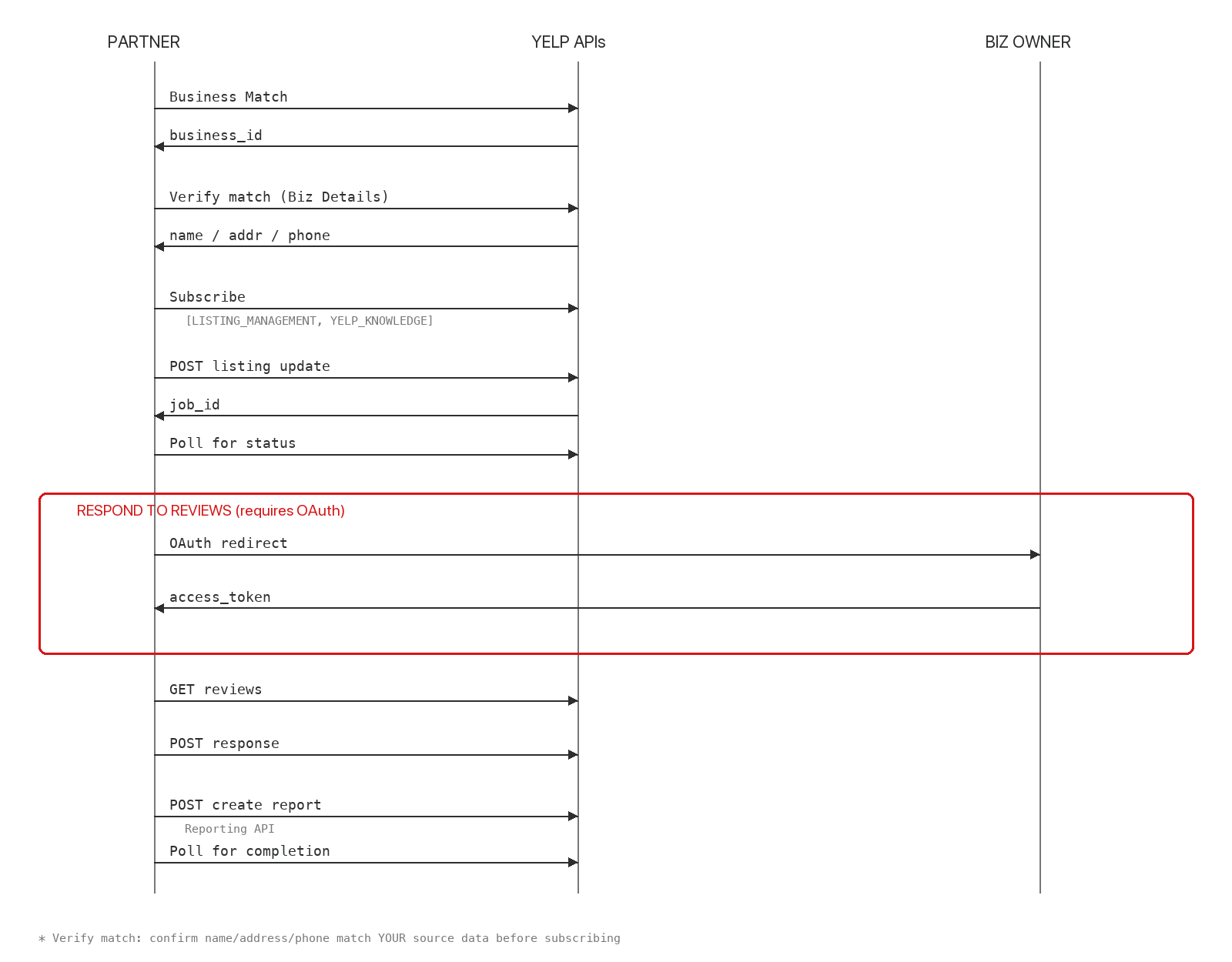
Location Onboarding Data Flow
Here's a data flow visual of the above steps to onboard a location:
Managing Subscriptions and Billing
Subscription status determines what Yelp invoices you for. Manage subscriptions carefully:
Subscription and billing rules
- Subscribed = subject to invoice. Unsubscribe from locations you're no longer managing.
- MEC locations: Check MEC status on the 2nd and 16th of each month (or anytime during the 1st and 2nd half). A location is MEC-eligible if the MEC flag was true at any point during the respective month.
- Unsubscribe promptly When a customer churns to avoid charges for the next billing period.
- Automatically validate and clean-up subscriptions You should have an automated job that retrieves your currently subscribed locations, checks that against the active status on your end, and sends additions/removals as needed to Yelp so our records stay in sync.
Authentication Reference
Different endpoints require different credentials:
| Auth type | How to obtain | Used for |
|---|---|---|
| Fusion API key | Visible in your app dashboard alongside your client_id | Subscribe to webhooks, get webhook subscriptions, get business details, & retrieve metrics |
| OAuth access token | Obtained after business owner completes OAuth flow | Respond to reviews, retrieve claimed businesses, retrieve business owner info |
| Data Ingestion basic auth | Issued by Yelp during onboarding | All Data Ingestion API calls |
Get Location Info
Two endpoints provide location information:
Fusion API : Business Details
GET https://api.yelp.com/v3/businesses/{business_id}
Returns: name, address, phone, hours, review count, rating, & MEC status.
Partner Support API : Business Info
Returns: advertising-related attributes, call tracking number, CTA buttons, categories, partner business ID, search removal status
Useful Links
- OAuth flow guide
- Webhooks guide
- Subscribe to webhooks
- Get Private Reviews endpoint
- Respond to Review endpoint
- Retrieve Claimed Businesses
- Retrieve Business Owner Info
- Business Details endpoint
- Data Ingestion API reference
- Reporting API reference
Support
For API issues that are not resolvable via our docs:
- Email: [email protected]
- Please provide:
- API Request
- API Response
- job_id: if related to a data ingestion request
- report_id: if related to a reporting api request
- Please provide:
For listing escalations like locked fields, rejections, or obviations:
- Submit a line item to the Listings Escalations doc provided during onboarding
FAQs
Check our detailed FAQs here.
Updated 2 months ago