
Partner Integration Guide
End-to-end integration guide for the Yelp Leads API, covering authentication, webhooks, messaging flows, and testing.
Table of contents:
- Overview
- Key Concepts
- Getting Started
- Authentication & Security
- Webhook Setup
- API Integration
- Email Masking
- Consumer Phone Sharing
- Error Handling
- Testing & Environments
- Frequently Asked Questions
- Support & Contact
- Partner Reporting to Yelp
1. Overview
Before you begin
For eligibility requirements, business prerequisites, and a video walkthrough of the technical data flow, see the Yelp Leads API overview.
The Yelp Leads API allows partners to ingest, track, and manage leads generated through Yelp's "Request A Quote" flow. Designed for streamlined CRM onboarding, this guide details how to set up a secure, end-to-end integration and covers recommended workflows.
Use Cases:
- Automatic syncing of Yelp-generated leads into your CRM.
- Enabling businesses to read consumer messages and respond from within your interface.
- Receiving consumer phone sharing notifications when consumers share their real phone number (if eligible).
2. Key Concepts
| Term | Meaning |
|---|---|
| Lead | A project or inquiry submitted by a Yelp user to a business. A lead is generated at the start of a conversation between a user and business owner. Every thread between a user and a business owner in Yelp classifies as a single lead. |
| Event | A message or activity related to a lead (e.g., a new reply). Every interaction in a lead is called an (interaction) event. |
| Masked Email Addresses | Temporary proxy email addresses used for communication. Valid for up to 30 days from lead creation. |
| Channel | The channel represents the type of message ingestion, i.e. how a message entered the lead conversation. Messages can be created via SMS, email, the Leads API, the Yelp Inbox/App, and other channels. |
| Consumer Phone Sharing (optionally shared with enabled partners) | When a consumer hasn’t opted in to receiving the phone calls while creating a lead but types a phone number in the lead chat, Yelp can share this phone number with the partner via the Get Lead endpoint. A webhook notification is sent when this happens. |
3. Getting Started
Prerequisites
- Yelp technology partner approval
- API credentials (OAuth client ID/secret)
- Allowlisted redirect URIs for OAuth flow
- An HTTPS endpoint able to receive webhooks (for real-time lead and event notifications)
Pre-Integration Checklist
Before beginning implementation, confirm the following with Yelp:
- Message content types: Does your platform send any non-text content to consumers (HTML emails, PDF attachments, images, rich text, invoices, estimates, etc.)? Yelp's masked email parser only supports plain text thus rich content will cause parsing failures. If your platform sends non-text content by default, this must be identified upfront so we can determine whether custom solutions or content stripping are needed. See Section 7: Email Masking for details.
- Communication channels: Which channels does your platform use to communicate with consumers (in-app chat, SMS, email, phone calls)? Understanding this is critical to avoid duplicate messages as all masked channels (SMS, email) route through Yelp's lead thread. See Section 7 for how this works.
Setup Steps
Step 1: Create a Yelp Developer App
In order to begin the process for using our Leads API we ask you to create a "Yelp Developer App" which is Yelp's way of interacting with our various APIs.
Please perform the following steps:
-
Create a personal Yelp user account on www.yelp.com/signup if you do not have one yet.
-
Go to www.yelp.com/developers/v3/manage_app to create your Yelp Developer App:
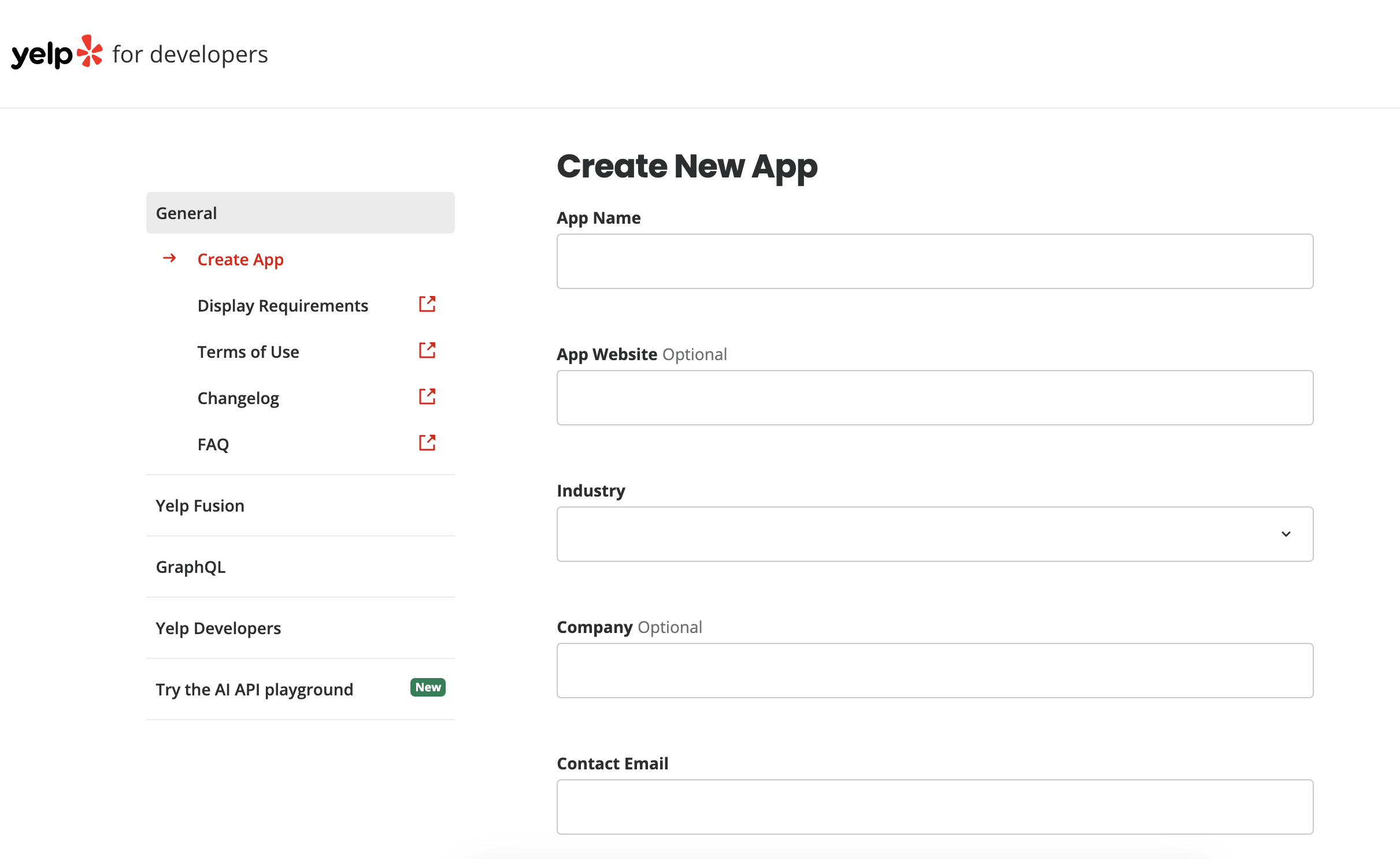
- Choose a meaningful name and description for your Developer App.
- Use one of your company's email addresses as the contact email address and select "Base" as the Access Tier.
- Note: You might get some automated messages about "Yelp Fusion Trial access", you can safely ignore those messages OR add your Yelp Sales Engineer to the thread if needed. Your access to Leads API is not subject to trial restrictions.
- Click "Create App"
-
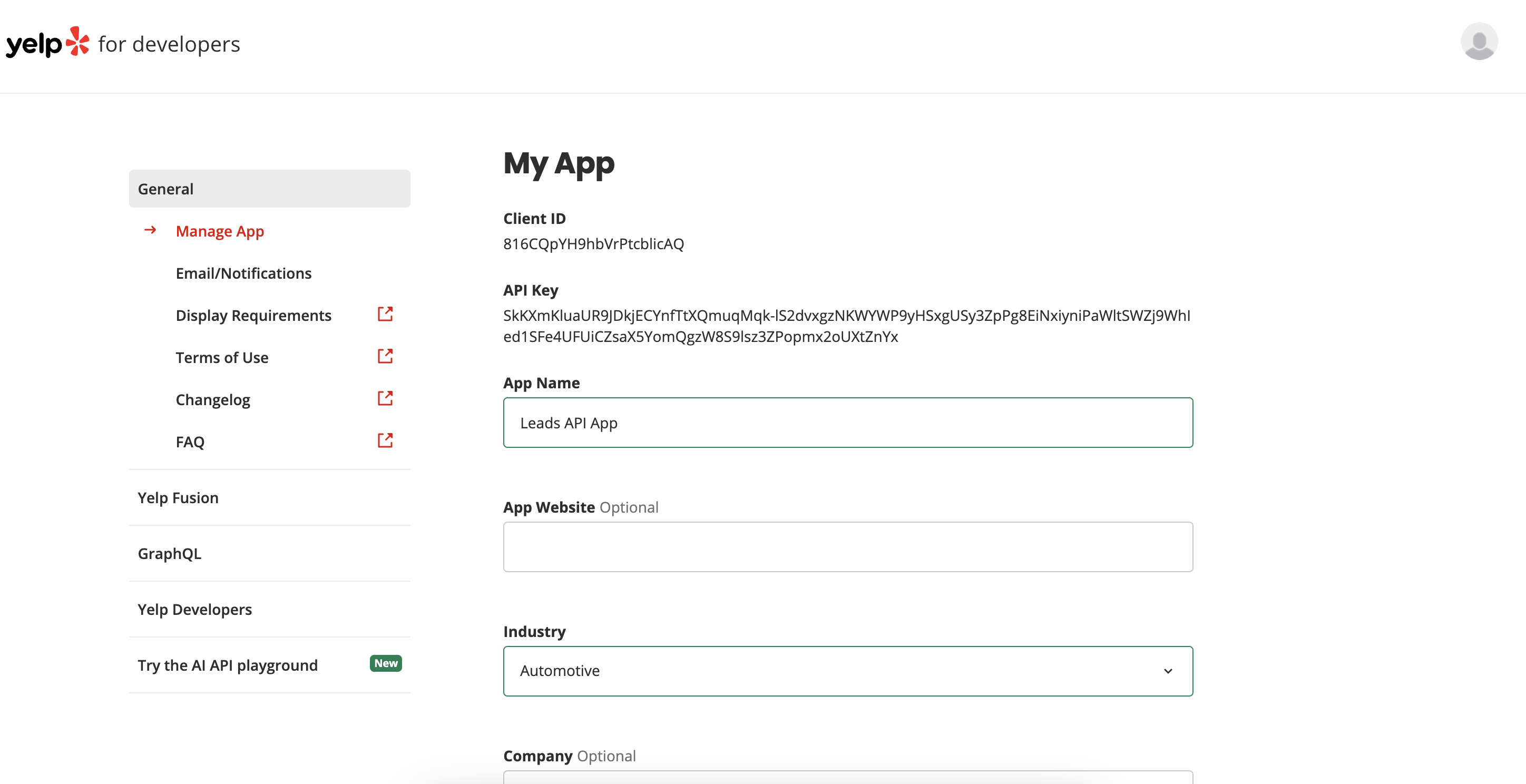
On the next page, you will see your individual Client ID and API Key. You can always return to this page by navigating to www.yelp.com/developers/v3/manage_app and login using your Yelp account.
-
Save the Client ID and share it along with your redirect URI(s) with the Yelp partner team so they can enable Leads API access, securely issue you a Client Secret, and configure any necessary rate limit overrides for your app. The redirect URI(s) must be HTTPS endpoints where Yelp will redirect users after OAuth authorization. Please make sure to keep your API Key private.
Note there are 2 different types of Yelp accounts, both will be used while building and testing your integration:
- Consumer account - a personal Yelp account that can be used to review businesses, post photos, follow friends, requesting quotes from business etc.
- This is the account type you just used to create the Developer App.
- If you're ever unsure, check your browser URL to ensure you are at yelp.com.
- Business owner account - where you login to view your claimed businesses, manage ads, respond to reviews etc.
- This is the account type you will use when logging in via the OAuth flow to "Read and Respond to Yelp Leads". You likely already have a Yelp Business Owner account, otherwise, please ask your Yelp Rep to create one for you.
- If you're ever unsure, check your browser URL to ensure you are at biz.yelp.com.
Step 2: Configure OAuth
Complete OAuth configuration to authenticate business users. See Section 4: Authentication & Security.
Step 3: Subscribe to Webhooks
Register your webhook endpoint using the self-serve webhook API. See Section 5: Webhook Setup.
Step 4: Implement API Endpoints
Implement the core integration: fetching new leads, reading messages, and replying to consumers. See Section 6: API Integration.
4. Authentication & Security
The Yelp Leads API uses OAuth 2.0 Authorization Code flow.
Documentation: Yelp OAuth Authorization Code Workflow
Key requirements:
- Store all secrets and access tokens securely; refresh tokens following expiration best practices.
- All API traffic must use HTTPS.
We suggest using these 3 scope when initiating the oauth request
leads- enables reading leads and responding to them.r2r_get_businesses- enables the ability to retrieve a list of businesses that the business owner has "claimed" aka businesses that this user can respond to reviews for.r2r_business_owner- enables the ability to retrieve information about the business owner like username and profile photo.
5. Webhook Setup
Webhooks are the primary mechanism for receiving real-time notifications about new leads and lead activity. The Yelp Leads API uses a self-serve webhook model.
Step 1: Authenticate
Obtain an OAuth 2.0 access token using the Authorization Code flow. Authorization Code Workflow Documentation.
Step 2: Subscribe to Webhooks
Using this token, make a POST request to https://api.yelp.com/v3/webhooks with the following parameters:
webhook_url(required): Your HTTPS endpoint that will receive webhook notifications.webhook_type(required): The type of webhook event to subscribe to (e.g., leads_event).
This automatically subscribes the authenticated biz user to receive webhook notifications for all businesses they have access to. No manual business selection is required.
The response returns:
webhook_id: Use this to unsubscribe later.expiration_date: When the subscription expires.
IMPORTANT! Webhook Expiration: Webhook subscriptions expire after 14 days by default. To ensure no loss of data, you must unsubscribe and resubscribe at least an hour before the expiration date. We recommend automating this renewal process.
Step 3 (Optional): Restrict to Specific Businesses
If you want to receive webhooks only for specific businesses (rather than all businesses the user has access to), you can pass an optional restricted_business_ids parameter in the subscribe request with a list of Yelp Business IDs.
To retreive a list of business_ids already claimed by the business owner, send this request.
Step 4: Unsubscribe (when needed)
To unsubscribe, send a DELETE request to https://api.yelp.com/v3/webhooks/{webhook_id} using the webhook_id returned during subscription.
Webhook Event Types
You will receive webhook notifications when:
- A new lead is created →
event_type: NEW_EVENT - A new interaction occurs on an existing lead (e.g., a new message) →
event_type: NEW_EVENT - A consumer opts into receiving the phone calls →
event_type: CONSUMER_PHONE_NUMBER_OPT_IN_EVENT - A consumer opts out of receiving the phone calls →
event_type: CONSUMER_PHONE_NUMBER_OPT_OUT_EVENT
Webhook Payload Example (Lead Interaction)
{
  "time": "2022-06-09T09:41:14+00:00",
  "object": "business",
  "data": {
    "id": "SoVHhx7Hel_XX0DKCLp72Q",
    "updates": [
      {
        "event_type": "NEW_EVENT",
        "event_id": "IsKxQAYZNqCjvRRmNoiCUw",
        "lead_id": "TbvEUYEi02cmSBmqCjQbkg",
        "interaction_time": "2022-06-09T09:41:13+00:00"
      }
    ]
  }
}
Note: Webhooks do NOT include the full event content (message text, attachments). Use the Get Lead Events endpoint to retrieve complete event details.
Documentation:
6. API Integration
See the Official API Documentation for full specifications.
Key Endpoints
| Function | Endpoint | Method | Docs |
|---|---|---|---|
| Subscribe to Webhooks | /v3/webhooks | POST | link |
| Unsubscribe from Webhook | /v3/webhooks/{webhook_id} | DELETE | link |
| Retrieve a Lead | /v3/leads/{ID} | GET | link |
| Retrieve Lead Events | /v3/leads/{ID}/events | GET | link |
| Reply to a Lead / Write Event | /v3/leads/{ID}/events | POST | link |
| Mark Lead as Replied | /v3/leads/{ID}/mark_as_replied | POST | link |
| Mark Event as Read | /v3/leads/{ID}/events/mark_as_read | POST | link |
| Get Lead IDs for a Business | v3/businesses/{business_id}/lead_ids | GET | link |
Integration Touchpoints
A. Getting New Leads
When you receive a NEW_EVENT webhook, call GET /v3/leads/{lead_id} to retrieve the full lead details including:
- Consumer display name
- Project details (job type, survey answers, attachments, location, availability)
- Temporary masked email address (if available)
- A phone number shared by the consumer in the chat (if phone sharing is enabled for your account)
Documentation: Get Lead
B. Getting New Messages
When a webhook fires, retrieve new messages using GET /v3/leads/{lead_id}/events.
Webhook notifications are sent for both consumer and business messages, regardless of how the message was ingested. The channel field on BIZ events (user_type = BIZ) tells you the ingestion type, i.e., how the message entered the conversation. This might be useful to avoid duplicate messages. Must be enabled by Yelp for your account.
Documentation: Get Lead Events
C. Replying to Consumer Messages
Our preferred method for pros to respond to leads is via the API. It is the most seamless and efficient communication channel, avoids the duplication issues inherent in masked email/phone, and gives partners full control over the messaging experience within their own UI.
There are two integration patterns depending on your platform's capabilities:
Option 1: Unified Inbox (two-way communication via API)**
If your platform supports a unified inbox where pros can read and reply to messages directly, use the Write Event endpoint to send replies:
POST /v3/leads/{lead_id}/events
This is the recommended default. Messages sent via the API appear instantly in the Yelp lead conversation and are delivered to the consumer in the Yelp app. The pro never has to leave your platform. When a partner replies via the API, the message the consumer sees in the Yelp app is identical to a reply sent from a pro via the Yelp inbox.
Documentation: Write Lead Event
Option 2: Link back to Yelp (no unified inbox)
If your platform does not support two-way messaging, you can deep-link the pro back to Yelp's Leads Center to reply. Retrieve this link via the field:link_to_reply_in_yelp in the Get lead endpoint response.
GET https://api.yelp.com/v3/leads/{ID}
The link will follow this format: https://biz.yelp.com/leads_center/{business_id}/leads/{lead_id}
This opens the lead conversation directly in Yelp's business portal, where the pro can read and reply to the consumer.
Documentation: Get Lead
Messaging & Deduplication: Best Practices
This section is intended to outline messaging options on Yelp, it is up to the partner to decide which implementation best fits their needs.
There are two ways to respond to consumer lead messages:
- Via API (preferred/default) — see Section 6C for the two integration patterns.
- Via masked email — sends an email to the consumer's masked address, which routes through Yelp into the lead thread (see Section 7: Email Masking).
We strongly recommend responding via the API (#1) and setting that up as the biz user's default. It is the most seamless channel, avoids duplication, and keeps the biz user within your platform. Use masked email only when the partner's platform requires it or the biz user explicitly prefers those channels.
Deduplication via the channel Field
The channel field on BIZ events (user_type = BIZ) tells you the ingestion type, i.e., how the message entered the conversation. This might be useful to avoid duplicate messages. Must be enabled by Yelp for your account.
Currently tracked channel values:
API-SELF: Sent via the Leads API by your own OAuth client (i.e., messages you already know about).
Messages can also be created via other channels (e.g., Yelp Inbox, masked email), but the channel field is not yet populated for those, i.e. it will be absent from the event. This means if a BIZ event has no channel field, it was sent via an untracked channel.
Recommended filtering logic:
- If
user_type = CONSUMER→ Ingest all messages. - If user_type = BIZ:
channel = "API-SELF"→ Filter out. These are messages your integration sent.channel = "SMS"→ This channel value applied to legacy masked-number SMS flows. For new leads, SMS sent directly to the consumer's real number does not flow through Yelp's lead thread and will not generate a webhook event.channel absent→ Ingest. These came from an untracked channel (Yelp Inbox, email, etc.).
The exact filtering depends on your integration's communication channels. Discuss with Yelp during the pre-integration phase (see Section 3: Pre-Integration Checklist).
Contact Yelp to enable the channel field for your account.
7. Email Masking
Yelp masks consumer email addresses to protect user privacy and ensure a secure, consistent communication experience. By routing messages through masked channels, Yelp can monitor for abuse, enforce platform policies, and provide a seamless way for businesses and consumers to interact without exposing personal contact information.
Email Masking
The temporary/masked email address of the lead submitter is returned via the Get Lead endpoint. It can be used for communications for up to 30 days until it expires.
How it works: When a biz user sends an email to the masked address, Yelp receives the email, parses the body, and routes the content into the Yelp lead conversation (the same conversation visible in Yelp Inbox / Leads Center and via the Leads API). The consumer sees the message in the Yelp app. This means:
- Emails sent to the masked address appear as messages in the Yelp lead thread. If your integration also displays messages from the Leads API, sending an email via the masked address will result in the message appearing both as a sent email in your UI and as an inbound Leads API event — causing duplicates.
- Recommendation: If your CRM sends messages via the Leads API (
POST /v3/leads/{ID}/events), do not also send the same message(s) via email to the masked address for the same lead. Choose one communication channel per lead to avoid duplication.
Limitations:
- 30-day expiry: The masked email address expires 30 days after lead creation. The exact expiry timestamp is returned in the
temporary_email_address_expiryfield of the Get Lead response. - Plain text only: Yelp's email parser does not support rich content. HTML, attachments (PDFs, images), and complex formatting will cause parsing failures. See best practices below.
- No marketing emails: As a Yelp policy, partners should not use masked emails for marketing or review solicitation.
Best practices for emailing via masked addresses:
- Use plain text only. Including HTML formatting can break email parsing.
- No HTML or rich text formatting
- No embedded links
- No images or attachments (PDFs, invoices, etc.)
- Block marketing emails from being sent to masked email: Additionally, if biz users want to send marketing emails, they should ask for the consumer's direct, unmasked email.
Correct example:
Thank you for your interest in our services. We're excited to help you with your project! Please feel free to reach out if you have any more questions.
Best regards, The Team
Incorrect example (will break parsing):
Thank you for your interest in our services. We're excited to help you with your project!
- Please feel free to reach out if you have any more questions.
- Check out our website at https://www.example.com/our-team/about-us/page
Best regards, The Team
8. Consumer Phone Sharing (for enabled account only)
When enabled for your account, Yelp can share any number that the consumer types in the chat with your integration under certain conditions.
How It Works
Every time consumer types their phone number in the chat:
- If the consumer has opted in:
- No phone sharing webhook notification is sent (in this case as we’ll already be sharing the real consumer phone number in the get_lead endpoint)
GET /v3/leads/{lead_id}return the unmasked number in the phone_number field (and also temporary_phone_number field depending on whether the client is an existing masking client or not)
- If the consumer hasn’t yet opted in to receive the phone calls:
- You’ll receive a
CONSUMER_PHONE_NUMBER_AVAILABLE_EVENTwebhook indicating that the consumer has typed a phone number in the chat GET /v3/leads/{lead_id}will now include the consumer’s phone number in the phone_number field
- You’ll receive a
Requirements
- This feature must be enabled by Yelp for your OAuth client.
- The consumer must type a valid US phone number in the chat
Contact Yelp to discuss enabling consumer phone sharing for your integration.
9. Error Handling
For full error code details per endpoint, see the Yelp Leads API Documentation.
Rate Limiting
The API enforces two levels of rate limiting:
- Per-endpoint QPS (queries per second) limit: Each endpoint has a per-client QPS cap. The default for most Leads API endpoints is 5 requests per second. This can be raised per-client by Yelp — contact [email protected] if you're hitting limits during normal operation.
- Daily request limit: Each API client has a total daily request limit across all endpoints. The default is 500 requests/day, but partner integrations are typically provisioned with a higher limit. If you're approaching your daily limit, contact Yelp to have it raised.
When either limit is exceeded, the API returns a 429 Too Many Requests response with the error code TOO_MANY_REQUESTS_PER_SECOND.
Retry Recommendations
- 429 (Rate Limited): Back off exponentially. Do not immediately retry at full speed.
- 500 / 503 (Server Errors): Retry with exponential backoff up to a maximum of 5 retries.
- 400 / 401 / 403 / 404 (Client Errors): Do not retry without fixing the request. For 401, refresh your OAuth token and retry.
Common errors to watch for:
PARTNER_ENDPOINT_DISABLED(403): The endpoint has not been enabled for your API client. Contact [email protected].SAME_SUCCESSIVE_MESSAGE(400): Sending the same message to the same lead within an hour is blocked. Wait for a consumer response or send a different message.UNAUTHORIZED_BUSINESS_MINIMUM_ADVERTISING(403): The business isn't currently advertising — leads are only available for advertising businesses.
10. Testing & Environments
Test Account Setup
Yelp will provision a test business for your integration testing. To set this up:
- Choose a business owner account from your organization to be added to the test business. If you don't have one, ask your Yelp representative to create one for you.
- Inform Yelp of that user's email address. Yelp will add them as a "Business Owner" on the test business. The user will receive a welcome email with login instructions.
- Create a consumer account on yelp.com/signup if you don't have one. You'll use this to submit test leads via the "Request A Quote" flow.
Note: There are two types of Yelp accounts used during testing:
- Consumer account — a personal Yelp account used to submit requests/quotes to businesses (simulates the end-user).
- Business owner account — used to log into biz.yelp.com, view leads, and manage businesses. This is the account that goes through the OAuth flow.
Creating Test Leads
- Visit the test business page on yelp.com.
- Click "Get pricing & availability" (or equivalent RAQ button).
- Fill out the form with test details and submit.
- You should receive a webhook notification within a minute.
- You can then reply as the consumer via "Projects" on yelp.com, or as the business owner via biz.yelp.com inbox.
- Both actions will trigger additional webhook notifications.
You can monitor Yelp API outages at status.developer.yelp.com.
Webhook Testing
Before testing, ensure your webhook endpoint:
- Accepts HTTPS POST requests.
- Returns a 2XX status code for successful receipt.
If Yelp receives a non-2XX response from your webhook URL, it will retry at increasing intervals. After 24 hours of unsuccessful retries, the notification is discarded.
Yelp sends webhook notifications from the following IP addresses (allowlist these if needed):
52.35.20.1
52.35.117.102
52.35.163.243
52.70.234.63
52.70.234.62
52.70.115.133
Consumer User Quarantine Risk
Yelp has spam detection systems that can automatically quarantine consumer user accounts. During testing, high-volume or repetitive message patterns from test consumer accounts can trigger these checks, causing the test consumer to be quarantined. When quarantined, messages from that consumer will stop being delivered and no webhooks will be sent.
To avoid this during integration testing:
- Coordinate with Yelp to pre-provision test consumer accounts that are excluded from spam filters, or to allowlist specific test users.
- Avoid sending large bursts of messages from a single test consumer in a short period.
- If a test consumer gets quarantined, contact Yelp support — the account can be manually unquarantined, but it may take time and disrupt your testing timeline.
End-to-End Testing Checklist
- Webhook delivery: Verify you receive
NEW_EVENTwebhooks for new leads and new messages. - Get Lead: Confirm you can retrieve full lead details including project info, consumer display name, and masked email/phone (if enabled).
- Get Lead Events: Confirm you can read the full conversation thread.
- Write Event: Send a reply via the API and verify it appears in the Yelp Inbox.
- Deduplication: Send a message via the API and confirm the
channelfield correctly returnsAPI-SELFon the resulting webhook event. - Masked email: If applicable, send a plain-text email to the masked address and verify it appears in the lead thread.
- Phone number: Verify the phone_number field is populated in the Get Lead response for an opted-in consumer lead. Confirm temporary_phone_number also contains the same real number for backward compatibility.
- Phone sharing webhooks: If enabled and for consumers who haven’t yet opted in, verify you receive
CONSUMER_PHONE_NUMBER_AVAILABLE_EVENTand can retrieve the phone number shared by the consumer in the chat, from the Get Lead endpoint - Webhook expiration: Verify your renewal automation works by letting a subscription expire and confirming you stop receiving webhooks, then resubscribe.
11. Frequently Asked Questions
Q: What happens if my webhook endpoint is down?
A: Yelp will retry delivery for failed webhooks. However, prolonged downtime may result in missed notifications. We recommend using the GET /v3/leads/business/{business_id}/lead_ids endpoint to periodically reconcile and catch any leads that may have been missed.
Q: How do I avoid duplicate messages in my CRM?
A: Request Yelp to enable the channel field on your Get Lead Events responses. Then filter out BIZ events where channel = "API-SELF" (messages your integration sent) or channel = "SMS" (messages sent via SMS from the biz user's phone). See Section 6B for the full filtering logic.
Q: How long do masked emails last?
A: Masked email addresses expire after 30 days from lead creation.
Q: How often do I need to renew my webhook subscription?
A: Webhook subscriptions expire after 14 days by default. You must unsubscribe and resubscribe before expiry to avoid missing notifications. We recommend automating this renewal.
Q: How do I map Yelp leads to CRM objects?
A: Each Yelp lead has a unique lead_id. Use this as the primary key to map to your CRM's lead/job/project object. The Get Lead endpoint returns all details needed for CRM record creation (consumer name, project details, survey answers, etc.).
Q: Does the webhook subscription cover all businesses or just specific ones?
A: By default, subscribing to webhooks covers ALL businesses the authenticated biz user has access to. If you want to limit to specific businesses, pass the optional restricted_business_ids parameter during subscription.
Q: Do I need one OAuth token per business, or can one token cover multiple businesses?
A: One token from a business user with access to multiple businesses can cover all of those businesses. You do not need per-business tokens.
Q: What does the consumer see when a partner replies via API?
A: The message appears in the Yelp app attributed to the business name, identical to a pro's reply sent from their own Yelp inbox.
Q: How to determine if a Yelp profile (aka business id) can use Yelp's Leads API?
A: To use Yelp's Leads API, business needs to have Request-a-Quote active on their page. Not all businesses on Yelp are eligible for Request-a-Quote, eligibility is category dependant. To determine if a business currently has this enabled send this request and check the messagingpart of the response. If is_enabled=true& use_case_text has any value except Message the Businessit can use Yelp's Leads API. 'Message the Business' is not currently supported via Leads API.
"messaging": {
		"url": "https://www.yelp.com/raq/Vk7rtHcH89bvGh1GlhaeVA?#popup%3Araq",
		"use_case_text": "Request a Quote",
		"is_enabled": true
	}
Q: How can a pro enable and disable messaging on their Yelp page?
A: This is managed in their biz.yelp.com login, more details here.
12. Support & Contact
Status Page: https://status.developer.yelp.com/ → Partner APIs > Leads APIs
We recommend subscribing to status page updates to be notified of planned maintenance and unplanned outages.
For technical questions or production incidents contact your assigned sales engineer or account team.
Go-live: before going live, coordinate a live demo with your Yelp sales engineer to identify any potential issues or gaps.
13. Partner Reporting to Yelp
To help Yelp measure lead quality and optimize partner performance, Yelp requests that partners send lead outcome data after a pro acts on a lead.
Preferred method: Webhooks. Yelp can ingest your platform's existing payload structure — no custom format required. Contact your Yelp representative to configure the endpoint.
The payload should include at minimum:
yelp_lead_id— the Yelp lead ID to map the outcome back to the original leadstatus— outcome of the lead (e.g., completed, booked, cancelled)job_value— estimated or confirmed monetary value of the job (USD)
Additional fields (e.g., job category, response time, close rate) are welcome and may be used to improve lead quality scoring.
Updated 26 days ago